 Barwise
For guitarists, pianists, bassists, drummers
Loops that land on the bar.
Drop in a song you own. Barwise finds its beat grid, so the eight bars you keep fumbling loop seamlessly — first time, no dragging, no stutter at the seam.
Coming to the App Store for iPhone with iOS 27.
The problem
Setting a loop by hand is the tedious part.
Drag, nudge, repeat
Scrub to find the solo. Drag the loop start. Drag the end. Hit play — and it begins a fraction of a beat late, so it stutters at the wrap and feels wrong to play along to. Nudge it. Nudge it again. Then move to another passage and do the whole thing over.
A loop that's 40 milliseconds off is unusable for practice. Getting it right by ear and thumb is genuinely fiddly.
Tap roughly. Land exactly.
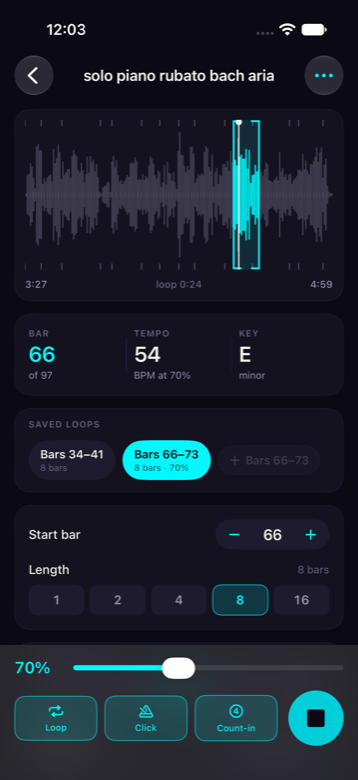
Barwise analyses the song once and knows where every beat and bar is. Tap anywhere on the waveform and the loop snaps to the bar — so it's not possible to set one that's out of time.
And because it knows the bars, you get things no other iPhone app can offer for your own audio: loop by bar number, a four-beat count-in, and a click locked to the recording.
What you get
Built for the ten minutes you spend on four hard bars.
Bar-exact looping
Loops are extracted whole and repeated sample-accurately. There is no seam to get wrong, at any speed.
Slow down, keep the pitch
40% to 120%, always in reach next to the play button — because speed is the control you touch most as a passage starts to click.
Count-in
Four clicks, then the music, in tempo — so you come in playing instead of scrambling. It slows down with the track.
Click on the beat
A metronome locked to the actual recording, with the downbeat accented. Useful exactly where the drums drop out.
Saved loops
Keep the three or four spots you drill. Each remembers its own speed and transposition, so picking one restores the whole setup.
Transpose
Twelve semitones either way, pitch only. For a capo you don't have, or a singer who needs it lower.
Tempo you can correct
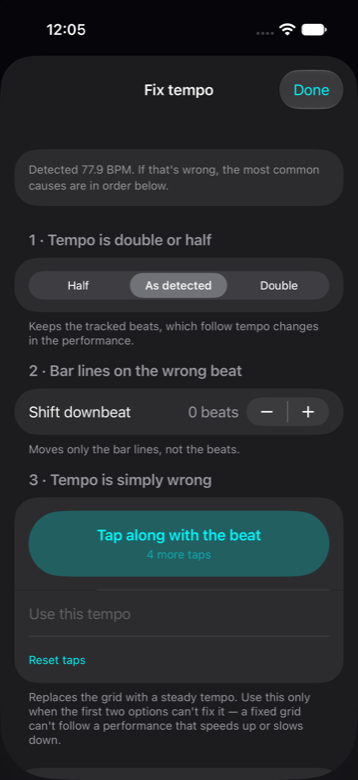
Detection is very good, not perfect. Halve it, double it, shift the downbeat, or tap the tempo in yourself. The app is never simply wrong.
Runs on your iPhone
Analysis happens on the device. No account, no sign-up, no uploads, no waiting in a queue. Works on a plane.
Levels matched
Imported files sit at wildly different volumes. Barwise measures loudness and evens them out, so switching songs doesn't mean reaching for the buttons.
A look around
Everything about a song, on one screen.
Your library
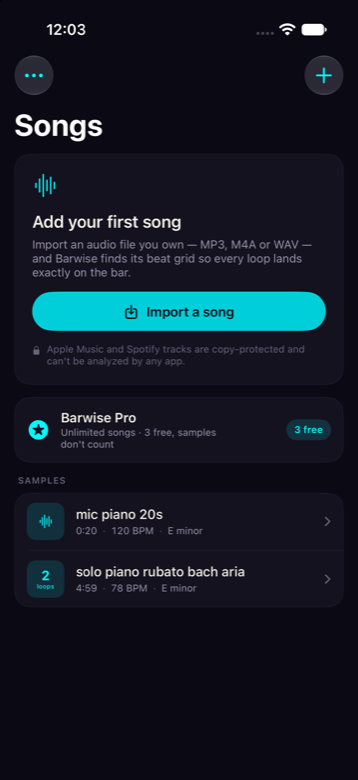
Tempo, key and length at a glance — plus how many loops you've built for each song, which is the quickest way to see where you left off.
When detection is wrong
Three fixes in the order they're usually needed: halve or double the tempo, shift the bar lines, or tap the tempo in by hand.
Read this before you buy
What Barwise can't do.
Better you know now than find out after paying.
It can't open Apple Music or Spotify
Streaming tracks are encrypted. No app can read the audio inside them — not Barwise, and not any of the alternatives, however they word it. Barwise works with files you own: MP3, M4A, WAV, AIFF, and anything you've recorded yourself.
It doesn't separate instruments
You can't mute the guitar and play its part. If isolating stems is what you need, Moises does that well and Barwise doesn't compete with it. Barwise is for drilling a passage against the actual recording.
It doesn't show chords or tab
No chord detection, no tablature. It tells you the key and the tempo, and it gets you looping the right eight bars in seconds.
iPhone with iOS 27
Barwise is built on a beat-detection framework that ships with iOS 27, so it can't run on earlier versions. iPad support is planned but isn't in the first release.
Pricing
Every practice feature is free. Pro just lifts the library limit.
No trial countdown, no locked buttons, no ads. Use the whole app on three songs for as long as you like.
Free
Three of your own songs
- Every feature, not a subset
- Bundled sample track to try
- No account, no ads
Yearly
per year, renews automatically
- Unlimited songs
- Cancel any time in Settings
Lifetime
one payment, no renewal
- Unlimited songs, for good
- For people who dislike subscriptions
Prices shown by the App Store in your local currency. Payment is handled by Apple — Barwise never sees your card.
Questions
Reasonable things to ask.
How do I get a song into Barwise?
Tap Import and pick an audio file — from Files, iCloud Drive, or anywhere you've saved one. You can also send a file to Barwise from Mail, AirDrop or any share sheet.
Why can't it use my Apple Music library?
Those files are encrypted, and iOS gives no app access to the audio inside them. It's a restriction from the music industry, not a choice any developer makes. If a song only exists in your streaming library, there's no legal route to the audio.
How long does analysis take?
Roughly ten seconds for a four-minute song, once, when you import it. After that it's stored with the song and opening it is instant — including after a restart.
What if it gets the tempo wrong?
It happens, most often on solo instruments and music with no steady pulse. You can halve or double the detected tempo, shift which beat carries the bar line, or tap the tempo in yourself. Any of those fixes the grid, and the loop snapping goes back to being exact.
Does it work offline?
Entirely. Analysis and playback run on your iPhone. The only time Barwise needs a connection is to show App Store prices.
Can I keep practising with the screen locked?
Yes. Playback continues when the screen locks or you switch apps, and the Lock Screen and Control Centre show play, pause and speed.
What data do you collect?
None. There's no account, no analytics and no tracking, and your audio never leaves the device. The privacy policy is short because there's very little to describe.